Workable pricing starts at $299 a month for companies with 1 to 20 employees, billed annually on the Standard plan, according to Workable’s own pricing page. Premier costs $599 a month and Enterprise $719 a month at the same size. Every price rises with your total headcount, not with the number of recruiters or jobs.
This guide lists every Workable plan at every company size, explains what each tier includes, and shows what add-ons and Workable Agent AI credits really add to the bill. It closes with a fair Workable review, a comparison of Workable alternatives, and how Workable vs Whitecarrot works out for a hiring team in the UAE, Saudi Arabia or Singapore.
How much does Workable cost in 2026?
Workable costs $299 a month on the Standard plan, $599 a month on Premier and $719 a month on Enterprise for a company of 1 to 20 employees paying annually. Those are the figures shown on the Workable pricing page in November 2026, and every one of them is a bundled Recruiting and HR plan. Only Standard can be paid month to month, at $360 a month. Premier and Enterprise are annual contracts only. Workable sells nine company-size bands, from 1–20 employees up to 1,000+, and the 1,000+ band is quoted by sales rather than listed. Workable offers a 15-day free trial with no credit card, but no free plan. The trial does not include the Workable Agent, so a buyer cannot test the AI features before paying. For most small and mid-sized companies, the real decision is between Standard plus a few add-ons and Premier, which bundles those add-ons in.
Plan
Billed annually (1–20 employees)
Billed monthly (1–20 employees)
Annual total
Standard
$299 a month
$360 a month
$3,588 a year (annual) or $4,320 a year (monthly)
Premier
$599 a month
Not offered: annual only
$7,188 a year
Enterprise
$719 a month
Not offered: annual only
$8,628 a year
How does Workable pricing change with company size?
Workable pricing scales with company headcount: the more people your company employs, the higher the monthly fee on every plan, whether or not you hire more. Workable’s help centre defines company size as the total number of employees working for your company and any affiliates or subsidiaries, contractors included. A 60-person business with 15 regular contractors therefore prices as a 51–100 company. The jump between bands is steep. Moving from the 21–50 band to the 51–100 band raises Standard from $419 to $669 a month, about 60% more for the same features. Paid accounts can move up a band at any time, and the move is charged pro rata for the rest of the billing cycle. If Workable support has set your band, you cannot select a lower one yourself.
Here are the annual-billing monthly prices for every band, read from the Workable pricing page:
Company size
Standard
Premier
Enterprise
1–20 employees
$299
$599
$719
21–50 employees
$419
$829
$989
51–100 employees
$669
$1,229
$1,469
101–200 employees
$949
$1,759
$2,109
201–400 employees
$1,299
$2,269
$2,719
401–600 employees
$1,749
$2,809
$3,369
601–800 employees
$2,249
$3,369
$4,039
801–1,000 employees
$2,799
$3,959
$4,749
1,000+ employees
Quote
Quote
Quote
Two details matter when you read this table:
The “save 20%” label is closer to 17%. Standard costs $360 a month on monthly billing against $299 on annual billing at 1–20 employees, a saving of about 17%. At 51–100 employees it is $800 against $669, about 16%.
Enterprise costs about 20% more than Premier at every band, for example $719 against $599 at 1–20 employees.
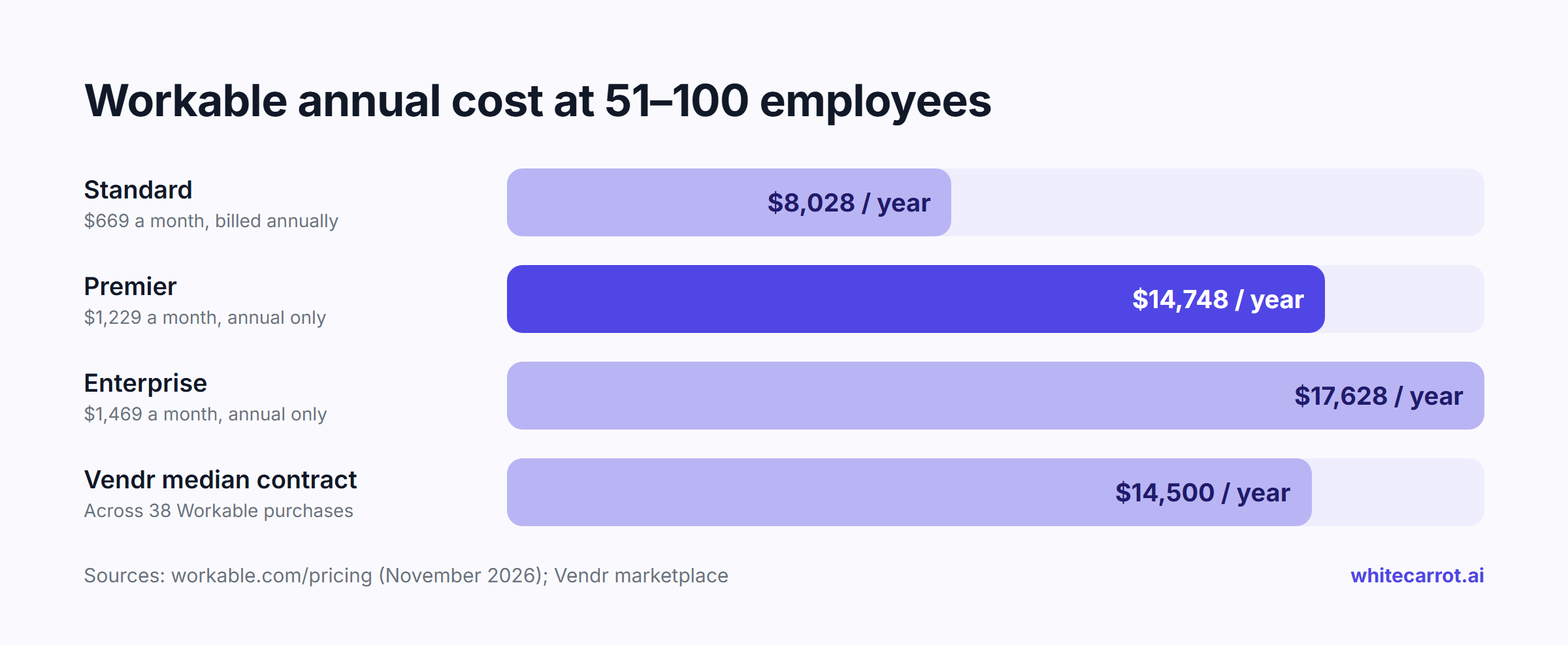
Annual list prices for a 51–100 person company, with Vendr's median Workable contract for reference.
What is included in each Workable plan?
Each Workable plan includes an applicant tracking system and core HR, and the higher tiers add candidate communication and assessment tools. According to the Workable pricing page, Standard covers recruiting basics and a full HR layer. Premier and Enterprise add the tools a high-volume team uses every day. Enterprise is described as the complete feature set; the page lists the same named inclusions for Premier and Enterprise, so compare the detailed feature list with Workable sales before paying the extra 20%.
Standard: candidate sourcing suite, applicant tracking, unlimited active jobs subject to fair use, hiring plans, nine native languages, custom report builder, extra permission sets and the Job Brief Agent. On the HR side: HRIS, onboarding, time off, time tracking, e-signatures, payroll preparation and payroll integrations. Single sign-on and priority support are listed too.
Premier: everything in Standard, plus texting, video interviews, assessments, referrals, and Performance & Engagement for HR.
Enterprise: everything in Premier, sold as the complete feature set, at a higher price per band.
All plans: self-service employee profiles, company files, an employee directory and an org chart.
What do Workable add-ons and AI credits cost?
Workable add-ons cost between $39 and $109 a month each on the Standard plan, and the Workable Agent is paid for separately in AI credits. At the 1–20 employee band, the Workable pricing page lists Texting+ at $89 a month, Video interviews+ at $109, Assessments+ at $59 and Performance & Engagement+ at $39. These are included in Premier and Enterprise. The arithmetic is worth doing: Standard at $299 plus video interviews and texting comes to $497 a month. Add assessments and performance reviews and it reaches $595, almost exactly Premier’s $599. A small team that needs two or more add-ons should therefore price Premier as well. The AI layer is billed on top of any plan. Every paid account starts with 3,000 free AI credits, which expire one year after purchase and are non-refundable.
What the Workable Agent does
AI credits used
Credit packs on sale
Evaluate: screens one candidate against your ideal profile
1 credit
5,000 credits for $600 ($0.12 each)
Source: adds one passive candidate to your pipeline
2 credits
10,000 credits for $1,000 ($0.10 each)
Chat: one session where a candidate answers at least once
10 credits
50,000 credits for $4,750 ($0.095 each)
A simple example shows how fast credits go. Screening 1,000 applicants uses 1,000 credits. Sourcing 500 passive candidates uses another 1,000. A hundred candidate chats uses 1,000 more. That one hiring push uses the full free allowance, and the next 5,000 credits cost $600. If you plan to rely on AI screening, budget for credits as a recurring line, not a one-off. Our guide to AI resume screening explains what to expect from automated CV scoring.
What do companies actually pay for Workable?
Companies pay a median of $14,500 a year for Workable, according to Vendr’s Workable marketplace page, which tracks real software purchases. Vendr reports a range of $10,473 to $20,912 a year across 38 Workable deals. That range matches list prices for companies of roughly 51 to 400 employees on Standard or Premier. For example, Premier at 51–100 employees lists at $14,748 a year, within a few hundred dollars of the Vendr median. Vendr also notes that multi-year commitments often bring prices down by 10–25%, and annual prepayment by 10–20% against monthly billing. Workable publishes its list prices, so negotiation tends to happen on term length, band and add-ons rather than on the headline rate. Vendr does not say which plans or company sizes its 38 deals cover, so treat the median as a sense check, not a quote.
Workable review: what does it do well, and where does it fall short?
A fair Workable review starts with transparency: Workable is one of the few applicant tracking systems that publishes prices for every plan and company size up to 1,000 employees. Greenhouse and Lever, by comparison, show no prices at all. Workable also bundles recruiting with a working HR layer, so a small company can run hiring, onboarding, time off and payroll preparation in one tool. Unlimited active jobs, nine languages and single sign-on on every plan are generous at the entry tier. The weaknesses are mostly about how the bill grows. Headcount billing charges a 300-person company for 300 people even if it hires five a year. Premier and Enterprise are annual only. The Agent is priced separately and cannot be tried during the trial.
Strengths: published pricing, recruiting and HR in one bundle, sourcing suite included, unlimited jobs within fair use, nine native languages.
Weaknesses: price rises with headcount rather than hiring volume, contractors count toward your band, add-ons on Standard, annual-only top tiers, AI billed in credits on top.
What are the best Workable alternatives on cost?
The best Workable alternatives depend on whether you want a cheaper ATS, a more structured enterprise ATS, or a different way of paying for hiring altogether. Greenhouse sells Core, Plus and Pro plans with custom pricing based on hiring needs. Lever also prices on request, scaling with team size. Neither publishes a number, so a like-for-like comparison with Workable needs a written quote. A hiring-first platform such as Whitecarrot takes a different approach: it focuses on the hiring workflow and works alongside the HR and payroll system you already run, rather than bundling HR in. Managed Hiring removes the software bill entirely and charges only when a hire is made.
Option
Pricing model
Published price
Best fit
Workable
Per company headcount band, recruiting and HR bundled
From $299 a month (1–20 employees, annual)
SMBs that want ATS and core HR in one tool
Greenhouse
Custom quote by plan (Core, Plus, Pro) and hiring needs
Workable vs Whitecarrot: which suits a GCC hiring team?
Workable vs Whitecarrot comes down to scope and billing. Workable bundles an ATS with core HR and prices by company headcount. Whitecarrot is built only for hiring, for teams in the UAE, Saudi Arabia and the wider GCC that want to fill roles faster without replacing their HRMS. The Whitecarrot AI Recruiter plans the requisition, posts to job boards, gathers candidates in one place, scores every CV, runs AI-assessed one-way video screening, schedules interviews in Google or Outlook, joins as an AI notetaker, collects structured feedback and manages offers through e-signature and HRMS onboarding. More than 88 companies across the GCC hire on Whitecarrot, and customers have cut time-to-hire from 45 days to under 20.
Alabbar Enterprises in Dubai cut recruiter admin from 42 hours a week to 6, with time-to-hire down from 44 days to as little as 2. Madi International switched from Manatal to Whitecarrot and now fills 405 roles a year across 163 openings in one place. If you would rather not run hiring yourself, Whitecarrot Managed Hiring delivers a shortlist within 24 hours for a fee of one month’s salary, with a 90-day replacement guarantee, and Rent-a-Recruiter puts a recruiter on your roles within 48 hours with no retainer.
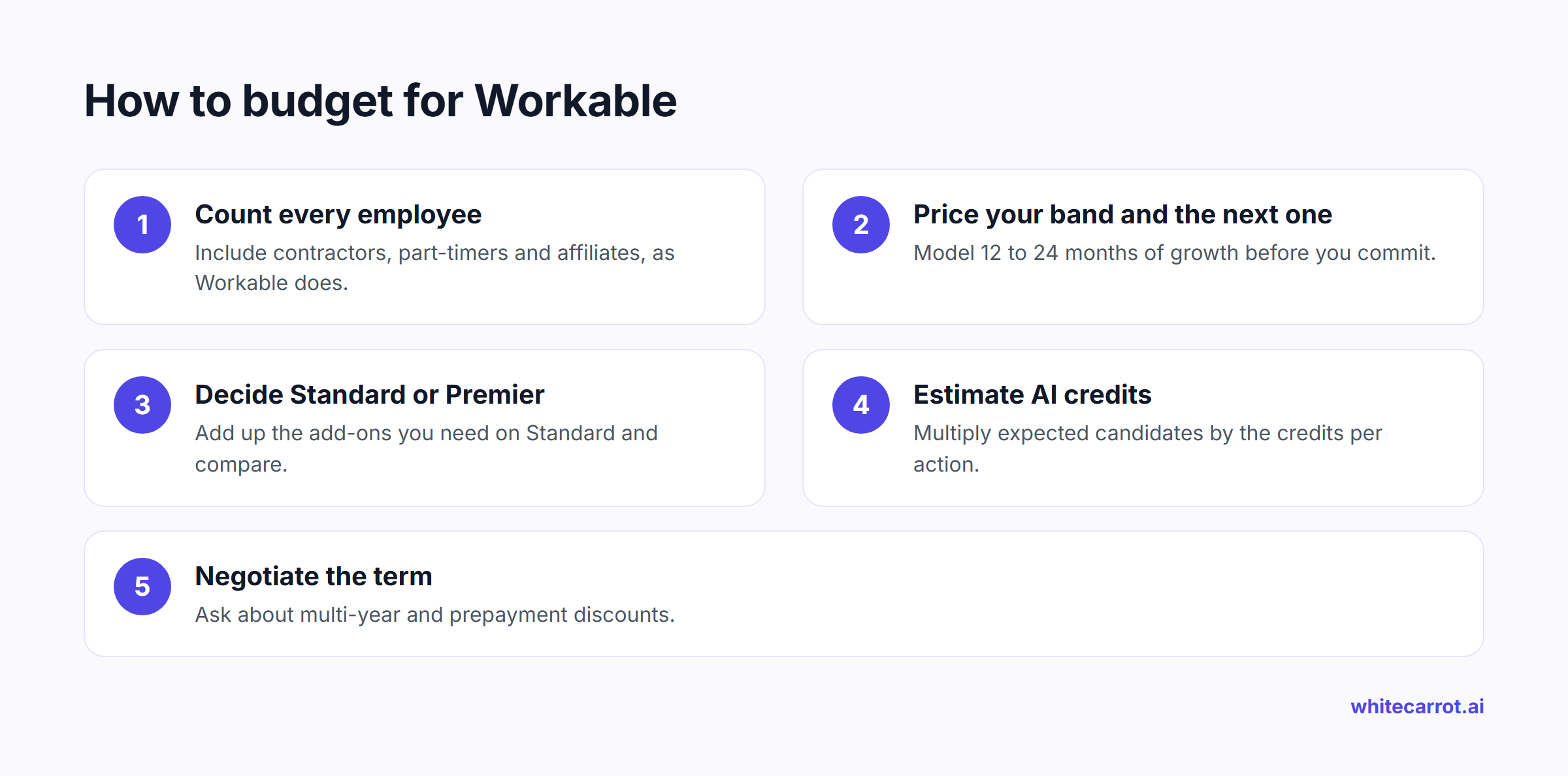
Keeping a Workable bill under control means pricing the company you will be in a year, not the one you are today. Headcount bands, add-ons and AI credits each move the total, so check all three before you sign:
Count every employee. Include contractors, part-timers and affiliates, as Workable does.
Price your band and the next one. Model 12 to 24 months of growth before you commit.
Decide Standard or Premier. Add up the add-ons you need on Standard and compare.
Estimate AI credits. Multiply expected candidates by the credits per action.
Negotiate the term. Ask about multi-year and prepayment discounts.
Run these five checks before you sign a Workable contract.
Workable is good value for a growing company of 20 to a few hundred people that wants recruiting and HR in one place and hires steadily. If your problem is hiring speed rather than HR software, compare the full Workable quote with a hiring platform built for that job.
Frequently Asked Questions
Common questions about this topic answered below.
Does Workable have a free plan or free trial?
Workable has no free plan, but it offers a 15-day free trial with no credit card required, according to its pricing page. The trial does not include the Workable Agent, so the AI sourcing, screening and chat features can only be tested after you pay. Paid accounts start with 3,000 free AI credits.
Is the Workable Starter plan still available?
Workable’s pricing page lists only Standard, Premier and Enterprise in 2026, so the cheapest plan for new customers is Standard at $299 a month for 1–20 employees, billed annually. Industry trackers report that the older Starter plan was closed to new sign-ups, which roughly doubled the entry price for very small companies.
Are video interviews included in Workable Standard?
No. Video interviews are an add-on on Workable Standard, listed at $109 a month at the 1–20 employee band. Texting, assessments and Performance & Engagement are add-ons too. All four are included in the Premier and Enterprise plans, which is why teams needing several add-ons should price Premier as well.
How does Workable count employees for pricing?
Workable counts every person working for your company and its affiliates or subsidiaries, contractors included, to set your company-size band. You can move up a band at any time and pay a pro-rated charge for the rest of the cycle. If Workable support has set your band, you cannot select a lower one yourself.
Table of Content
Skip the hiring hassle
See how Whitecarrot helps you source, screen, and hire faster with AI.