Recruitment workflow automation is the use of software to run the repeatable steps of hiring, such as posting jobs, collecting applications, screening CVs, scheduling interviews and sending offers, without a recruiter doing each one by hand. Recruiters keep the judgement calls; the software moves candidates from one stage to the next.
This guide is for HR leaders and talent acquisition heads who want to automate hiring without losing control of it. It covers which stages to automate, how rules, AI and AI agents differ, a step-by-step setup plan, the rules that apply to automated hiring, and the metrics that show whether it is working.
What is recruitment workflow automation?
Recruitment workflow automation connects the steps of a hiring process so that each one starts the next without manual hand-offs. Most automations follow one pattern. According to Recruiterflow's glossary of recruitment automation, a workflow runs as trigger, conditions, action and review: a candidate finishes an interview (trigger), no feedback has arrived after two days (condition), and the system reminds the interviewer (action). The same glossary separates two kinds of automation. Rule-based automation is deterministic, so the same trigger always produces the same action. AI-supported automation reads unstructured input such as CVs, emails and interview transcripts, and it needs more human review because it interprets rather than follows rules.
A recruitment workflow automation system usually sits inside or alongside an applicant tracking system. It is different from simply buying an ATS: an ATS stores candidates, while automation moves them. For a broader view of where AI fits, see our introduction to AI hiring automation.
Which recruitment workflows can you automate?
Almost every recruitment workflow has an automatable part and a human part. The table below maps a typical hiring process stage by stage. Read it as a checklist: for each stage, the third column is what software can take over, and the fourth is what your team should keep. Collecting applications and scheduling interviews are the easiest wins because they involve no judgement at all. Screening and interview notes come next, because AI can do the reading and summarising while a person still makes the call.
Stage
Manual work today
What automation does
What stays human
Plan
Writing the requisition and job description from scratch
Drafts the job description and hiring plan from the role brief
Approving the role, budget and must-have skills
Attract
Posting the same ad on every job board by hand
Publishes one ad to several boards and career pages at once
Choosing which channels fit the role
Collect
Copying CVs from email, LinkedIn and job boards into one sheet
Aggregates every application into one pipeline
Nothing; this step should be fully automatic
Screen
Reading every CV against the job description
Scores and ranks CVs against the criteria you set
Reviewing the shortlist and borderline cases
Pre-screen
Phone screens to check basics and communication
Runs one-way video screening and assesses the answers
Deciding who moves to a live interview
Schedule
Email chains to find a slot with three interviewers
Books interviews against Google or Outlook calendars and sends reminders
Nothing, apart from exceptions
Interview
Taking notes while trying to listen
Joins as a notetaker and collects structured feedback
Running the interview and judging the candidate
Offer and onboard
Building offer letters and chasing signatures
Generates the offer, sends it for e-signature and passes the hire to the HRMS
Negotiation and the final decision
Two stages deserve extra attention. Screening is where most recruiter hours go on high-volume roles, which is why AI resume screening is usually the first AI step teams add. Interview scheduling is where candidates are most often lost, because every day spent arranging a slot is a day a competitor can make an offer.
Rule-based automation vs AI hiring automation vs AI agents: what is the difference?
Rule-based automation, AI hiring automation and an AI agent for hiring candidates are three different levels of automated hiring, and most teams end up using all three. Rule-based automation handles predictable admin: send the rejection email when a candidate is moved to "not progressing". AI hiring automation handles reading and judging tasks that rules cannot, such as scoring a CV against a job description or summarising a video answer. An AI agent goes one step further. Weekday's 2026 guide to AI recruiting agents describes an agent as a system that works from a goal, such as filling a role, and carries out several steps itself instead of handling one fixed task.
Rule-based workflow automation
AI hiring automation
AI agent for hiring candidates
How it works
Trigger, condition, action: the same input always gives the same result
Reads unstructured input such as CVs, video answers and interview transcripts
Works toward a goal, such as filling a role, across several steps
Good at
Status emails, reminders, stage moves, calendar invites
Running a whole stretch of the funnel with fewer hand-offs
Risk
Breaks quietly when the process changes
Can repeat bias found in past hiring data
Errors can spread across steps before anyone sees them
Human review
Spot checks
Review of every shortlist
Review at each decision point
The practical rule: automate with rules wherever the right action is always the same, use AI where the input needs reading, and give an agent a stretch of the funnel only when you can review its decisions at each step. For more on agents, read what an AI recruitment agent is and how it works.
How do you automate a recruitment workflow, step by step?
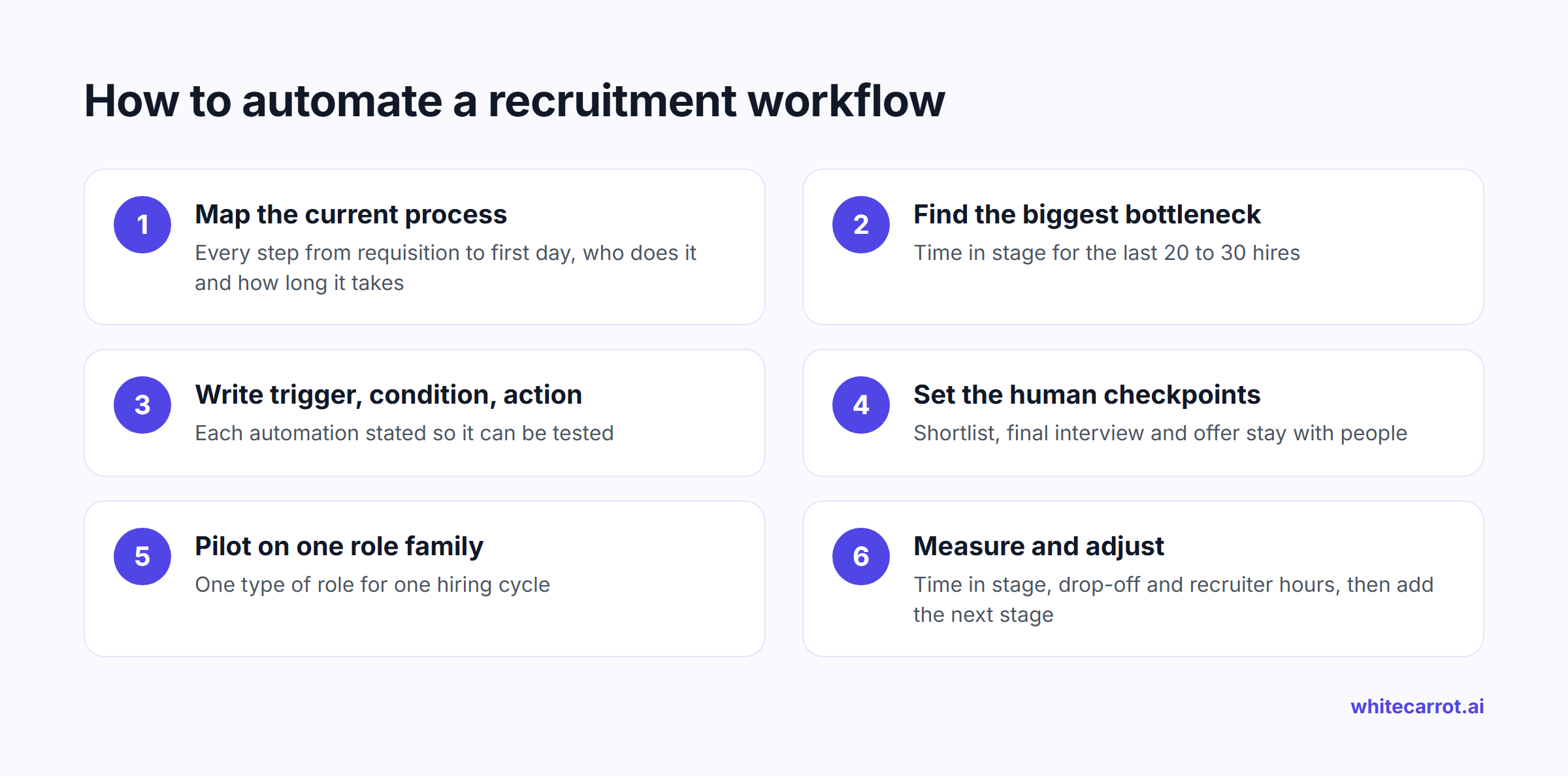
Automating a recruitment workflow works best as a series of small changes, each measured, rather than one big switch. The steps below suit an in-house team of two to twenty recruiters hiring across several role families.
Map the current process. Write down every step from requisition to first day, who does it, which system it happens in and how long it takes. Include the informal steps, such as WhatsApp messages to hiring managers.
Find the biggest bottleneck. Pull time in stage for the last 20 to 30 hires. The stage where candidates wait longest is where automation pays back first.
Write each automation as trigger, condition, action. "When a candidate scores above the threshold, invite them to video screening within one hour" is testable. "Speed up screening" is not.
Set the human checkpoints. Decide in advance which decisions a person must approve: the shortlist, the move to final interview and the offer.
Pilot on one role family. Run the new workflow on one type of role, such as customer service or sales, for one hiring cycle before rolling it out.
Measure and adjust. Compare time in stage, drop-off and recruiter hours before and after. Keep what worked, fix what did not, then add the next stage.
Six steps to automate a recruitment workflow, one measured change at a time.
What are the benefits of automated hiring?
The main benefit of automated hiring is time: recruiters stop doing admin and spend the hours on candidates and hiring managers. According to LinkedIn's Future of Recruiting 2025 report, talent teams experimenting with or integrating generative AI save about 20% of their work week, roughly a full day. The same report found that 35% of recruiters spend the time saved on candidate screening. Adoption is moving fast. SHRM's 2025 Talent Trends report found that AI use in HR tasks rose to 43% in 2025, up from 26% the year before.
Faster hiring. Candidates move to the next stage in hours instead of days, so fewer accept another offer while they wait.
Consistent screening. Every applicant is scored against the same criteria, rather than whichever CVs a tired recruiter reads first.
Better candidate experience. Every applicant gets a status update, an interview slot they can pick and a decision.
Hiring managers stay in the loop. Feedback requests, reminders and interview summaries reach them without recruiter chasing.
Usable data. When every step runs through one system, time in stage and source of hire are recorded automatically.
What should stay human in an automated recruitment workflow?
Recruitment workflow automation should take the admin, not the decisions. Recruiterflow's glossary makes the same point: recruiters still own candidate assessment, client advice and offer negotiation. In practice, keep four things with people.
The final hiring decision, and any decision to reject a candidate the system ranked highly.
Live interviews, where judgement about motivation, fit and potential matters most.
Offer negotiation, where salary, start date and role scope are traded.
Exceptions, such as career changers, returners and internal candidates whose CVs do not match the template.
What rules apply to AI and automated hiring in the UAE, EU and US?
Automated hiring is regulated differently by market, and a team hiring across the GCC and abroad may face several regimes at once. In the UAE, the UAE government's data protection page explains that Federal Decree Law No. 45 of 2021 on the Protection of Personal Data requires consent for processing, with some exceptions, and gives people the right to correct their data and to restrict or stop its processing. In the EU, Annex III of the EU AI Act lists AI systems used to place targeted job adverts, analyse and filter applications and evaluate candidates as high-risk. In New York City, Local Law 144 bars employers from using an automated employment decision tool unless it has had a bias audit within the past year, and requires notice to candidates 10 business days before use.
Three habits keep most teams on the right side of these rules: tell candidates when AI assesses them, keep a person responsible for every rejection decision, and ask your vendor how its scoring is tested for bias. This is general information, not legal advice; check the rules for each market you hire in with your counsel.
How do you measure whether recruitment automation is working?
Measure recruitment automation against a baseline taken before the first change. Six metrics cover most of what matters, and all of them should come out of your system automatically once the workflow runs through it.
Metric
What it tells you
How to read it
Time to hire
Days from application to accepted offer
The headline number; should fall within one or two hiring cycles
Time in stage
Days a candidate waits at each step
Shows which bottleneck automation has not fixed yet
Recruiter hours per hire
Admin time spent on each filled role
The direct measure of time saved
Candidate drop-off by stage
Where applicants abandon the process
A rise after a new automation means it is hurting candidate experience
Interview-to-offer ratio
How many interviews it takes to make one offer
Tests whether automated screening sends the right people forward
Offer acceptance rate
Share of offers accepted
Slow or impersonal offer steps show up here first
How Whitecarrot automates the recruitment workflow
Whitecarrot's AI recruiter runs the whole recruitment workflow in one place for teams hiring in the UAE, Saudi Arabia and the wider GCC. It plans the requisition, posts to job boards and aggregates candidates into one pipeline. It then scores every CV and runs AI-assessed one-way video screening. After that it schedules interviews in Google or Outlook, joins as an AI notetaker and collects structured feedback. Finally it manages offers through e-signature and hands the hire to your HRMS for onboarding. Your recruiters approve the shortlist and make every decision.
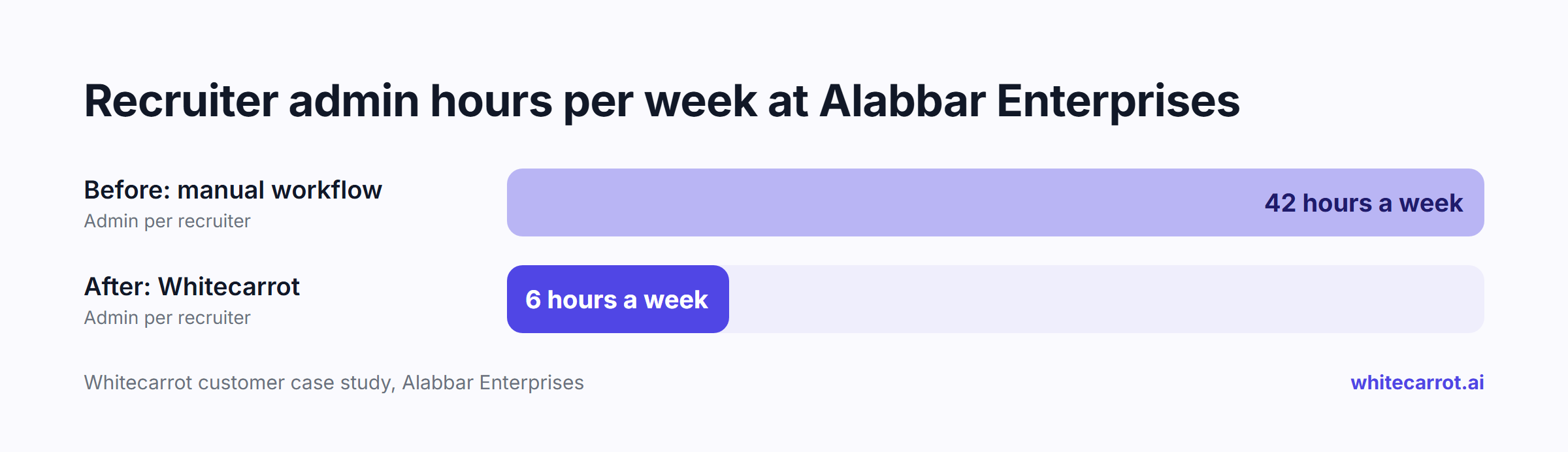
More than 88 companies across the GCC hire on Whitecarrot, and customers have cut time to hire from 45 days to under 20. At Alabbar Enterprises in Dubai, recruiter admin fell from 42 hours a week to 6, and the team made 2.3 times more hires with 60% fewer recruiters.
Recruiter admin time at Alabbar Enterprises, Dubai, before and after automating the workflow on Whitecarrot.
If you would rather hand the work over entirely, Managed Hiring delivers a shortlist within 24 hours. Want to see your own workflow automated? Book a demo and we will map it with you.
Frequently Asked Questions
Common questions about this topic answered below.
What is an example of recruitment workflow automation?
A common example is interview scheduling. When a recruiter moves a candidate to the interview stage, the system checks the interviewers' Google or Outlook calendars, sends the candidate a choice of slots, books the one they pick and sends reminders. If feedback has not arrived two days after the interview, it reminds the interviewer automatically.
Which recruitment tasks should you automate first?
Start with tasks that need no judgement and cost the most time: collecting applications from every job board into one pipeline, interview scheduling and candidate status emails. Once those run reliably, add AI CV screening and interview notes, with a recruiter reviewing every shortlist before candidates move forward.
Will recruitment automation replace recruiters?
No. Recruitment automation replaces the admin around hiring, not the recruiter. Software can post jobs, score CVs, book interviews and send offers, but people still run live interviews, judge fit, negotiate offers and make the final decision. Most teams use the time saved to work more closely with hiring managers and candidates.
Is AI hiring automation legal in the UAE?
Yes, AI hiring automation can be used in the UAE, but it must respect Federal Decree Law No. 45 of 2021 on personal data protection, which requires consent for processing with some exceptions and lets people correct or restrict use of their data. Tell candidates when AI assesses them and keep a person responsible for decisions.
Table of Content
Skip the hiring hassle
See how Whitecarrot helps you source, screen, and hire faster with AI.